Tuesday, December 13, 2016

My Guide to terraform - Part 2

During my past blog post on Terraform we discuss what is Terraform and why it is so popular among platform engineers.In this post, we will have a look on how to install Terraform on ubuntu machine and we will discuss instantiate an ec2 instance with Terraform.


Installing Terraform.
  • Step 1: First, we have to download the correct distribution for the operating system. All available distributions are available in the following location url
  • Step 2:It comes as a zip file, that contains binary version of a Terrafrom application so lets unzip the file to a folder in the file system.
    
    cd /home/amith/Documents/Software
    unzip terraform_0.7.13_linux_amd64.zip
    
    
  • Step 3: Now we have to add this binary file path into path environment variable, otherwise, we have to navigate to the directory which contains the distribution in order to execute it.

    PATH=/usr/local/terraform/bin:/home/amith/Documents/Software:$PATH

  • Step 4: execute the following command for checking the installation.If it return set of commands that means we are good to go

    terraform


Use case: Instantiate a t2.micro aws instance

As we discussed previously it's all about writing a source code. As all other source codes terraform also associated with a file extension and usually it is .tf.

vi ec2_create.tf

Before going forward we need few data.

  1. Valid aws access key and a secret key.
  2. Valid aws ami(amazon machine image)
  3. Instance type.

Here is the sample code.

provider "aws" {
  access_key = "ACCESS_KEY_HERE"
  secret_key = "SECRET_KEY_HERE"
  region     = "us-east-1"
}

resource "aws_instance" "example" {
  ami           = "ami-0d729a60"
  instance_type = "t2.micro"
}

Before move further try to understand the source.There are two ways of defining a resource with Terraform.

  • Terraform format - we use .tf extention
  • JSON format - we use .tf.json.

Why we have two formats and when to use them?

JSON is more machine friendly language so if you plane to generate terraform script in problematically make sure to use JSON format. But if you need a more human-friendly way of defining infrastructure then go with terraform format. Actually, terraform format is a wrapper for JSON, so there is no harm of using any one of them. It's up to you decide the appropriate format for the scenario.


Planing and applying

If you remember the goals we discussed in previous blog post, Terraform support dry runs, by using that feature we can plan the final outcome before actually doing the change.To run a plan you have to navigate into the file location where you define the terraform code.

cd /home/amith/WorkSpace/sandbox/terraform
terraform plan


this will take some time and generate a report.


Explain plan.
Plan: 1 to add, 0 to change, 0 to destroy.
This section summarizes the final outcome. According to this, it says one resource has to create and no any update or delete.


+ aws_instance.example

This section describes which resource going to create, + symbol denote a new resource creation. If it is - that means item is about to remove and if it is +- that means resource about to update.

For more simplicity in this report they use color codes

  • green - items to be created
  • red - items to be removed
  • orange - items to be update


If you look closer you may have seen there are some sections without values.
    availability_zone:        ""
    ebs_block_device.#:       ""
    ephemeral_block_device.#: ""
    instance_state:           ""

Those values will be generated by the provider since this is a dry run those data are not available at the moment.
Now we have a fair understanding of what will be the out come so let's create the resource.

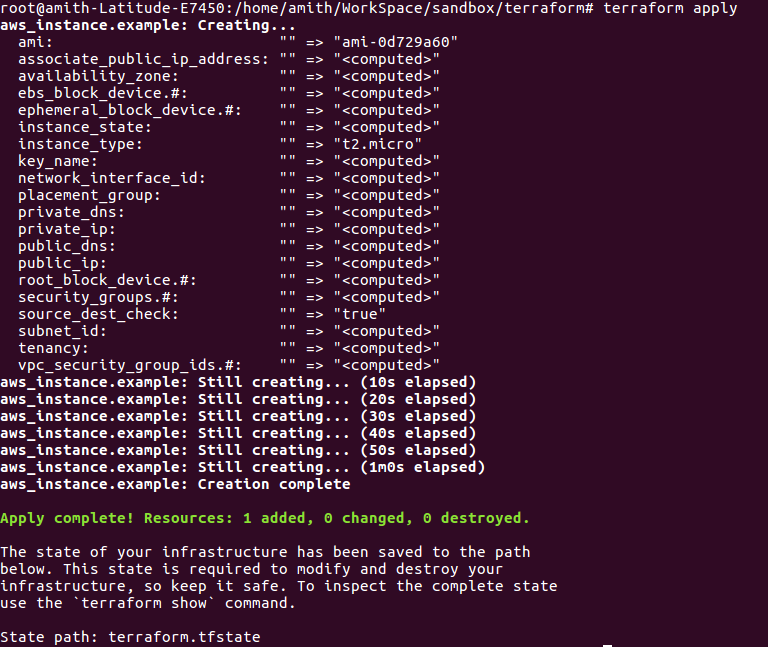
terraform apptly

this process takes some time to complete. Every 10 seconds it update the report.Once this is completed Terraform will create a new file which contains status(metadata) about the infrastructure and saved on the same location - terraform.tfstate.If you plan to share the code make sure to share this file as well.Without this file terraform will note able to do an update or show a status report next time so it's really important to keep this file safe.


To inspect the status.
terraform show

My Guide to terraform.

What is terraform

Terraform is a tool for building, changing, and versioning infrastructure safely and efficiently. Terraform can manage existing and popular service providers as well as custom in-house solutions. - Terraform start guide.

Well, this briefly explains what it capable of. So let's look at some of the key goals of Terraform as per the author of this nice technology.


  • Unify the view of resources using infrastructure as a code.
  • It's all about writing some code to model your infrastructure. You specify the resource on code snippet and describe it and hand over to Terraform to create it. The beauty of modeling an infrastructure as a code is, it brings all other advantages we got from a source code.Simply we can keep them on a repository, version them, review them, integrate with a CI/CD pipeline, automate the tests on infrastructure.

  • Support the modern data center ( IaaS, PaaS, SaaS )
  • It's capable of handling any of the above, as an example

    • IaaS --> EC2 is an infrastructure as a service by the AWS.
    • PaaS --> AWS OpsWork.
    • SaaS --> RDS.
    Terraform can integrate with any on those services.

  • Expose a way to safely and predictably change the infrastructure.
  • With Terraform you don't need to go and create the infrastructure. You can predict the infrastructure by dry running or here we called it plan. It gives you a report on your infrastructure and how it will be once you execute the script.Then you can review the changes and safely build or upgrade the infrastructure without affecting to any of existing.

  • Provide a workflow that is technology agnostic.
  • You don't have to bound to any specific provider. You can instantiate an ec2 which is AWS and you can use some other platform to create a database.


If you already playing with the infrastructures you should have plenty of questions on Terraform because you have played with other technologies which sound similar to Terraform.

It's not Chef or Puppet, both of them are cool technologies where we use to install and manage software on a hosts in other words they are managing configurations but Terraform is not.But you can use any of those configuration management technologies along with Terraform to configure the infrastructure which created with it.

CloudFormation, yes it has some similarities. Terraform inspired by the problem they solved the problem of modeling infrastructure as a code. But it is limited to a specific provider, you can't create a hybrid infrastructure with CloudFormation.

SDK like python boto empowered developers to access cloud providers in a programmatic way but terraform is not used for pragmatic access to cloud its simple infrastructure modeling in a human friendly way.

I think this is enough for a single blog post will meet you soon with another blog post with my hands on experience with terraform.

Wednesday, November 20, 2013

Java Logging - The true life saver

How you tackle a defect in your code, specially a server side code? Are you remotely debugging the code at first step? Yes it is convenient to do so and most of the time it save you from the defect. The real question is, can it save you from defects all the time? Imagine you have written a code which is highly dependable on external factors such as data base connection, server level configurations and fortunately all goes well in development environment as well as QA environment. Assume you suddenly got a complaint from the customers that your functionality is not working on production as they expected. How you tackle where it went wrong, are you still willing to perform a remote debug procedure on the production where we need to maintain high availability? Who’s gone to save you now? Don’t worry logger is here. Most of the time it save us from incidents (not all incidents are bugs)


My ABC of defect tackling on a server side code.
  • Try to find any unexpected event on server log at the time the issue was raised.
  • Identify the last known good server log and compare rest with code.
  • If neither of above is able to solve the incident, remotely debug the application.

So it is very important to maintain a good server log. My opinion is we should be able to tackle any issue without remotely debug the code.


Impact on application performance by java logging.

Logging has big influence on application performance since logger has to perform IO operations, string concatenations each time we ask logger to log a message so most of the developers avoid them but it is not advisable to avoid all of them. What we can do is to identify what are needed to be log and what are not. Keep in mind both less and excess logging is not preferable.


Determine the correct type of before log.

I’m using log4j as my logging provider but SL4j is grooming as the standard logging API. In log4j there are four types. It is really important to place log statement on correct category.

DEBUG : The lowest restricted logging type , ideally we should include all the information we need to debug the application but keep in mind DO NOT enable this level on production because it heavily impact on application performance.
Examples :
INFO : More restrictive than DEBUG and only for use to log informative events happens during the execution.
Examples :
WARN : More restricted than INFO and used to log warning and alerts.
Examples : ERROR : Most restricted and used to log exceptions. We need to take those logs as more serious and we must log more details to find out what is wrong.
Examples :
Important facts you should consider while logging.
  • Minimize string concatenations whenever you can.

    String concatenation is a costly operation we should minimize concatenations, even we are using INFO as our debug level so logger is never log anything mark as DEBUG but in JVM it is executed . As I mentioned above DEBUG should contain all the details we should use to tackle the issue so most probably there will be many string concatenations.
    Example : Solution 1 : Check debug level when there are too many string concatenations . Solution 2 : Use parametrized logger framework such as SL4J.

  • Minimize possibility of throwing exception while logging.

    Example :
    There are two possibility of getting NPE in above log statement. I’ve seen scenarios where actual exceptions are hidden by the exceptions thrown by the logger statements so try to avoid them because loggers are here to help us not to worst the situation.

    • Make sure logger is not null before log. Sometimes we are accidently using inherited logger instance which may not be initialized.
    • Make sure “person” object never be null in above statement.

  • Use descriptive log statement.

    Is there any use of follow log statement?

  • Never log sensitive data such as passwords, credit card numbers.
  • Avoid spelling mistakes and try to be grammatically correct all the time.